
Enter the Domain Extractor Free Tool, a Chrome extension designed to streamline domain extraction right from your browser—for free!
What is the Domain Extractor Free Tool?
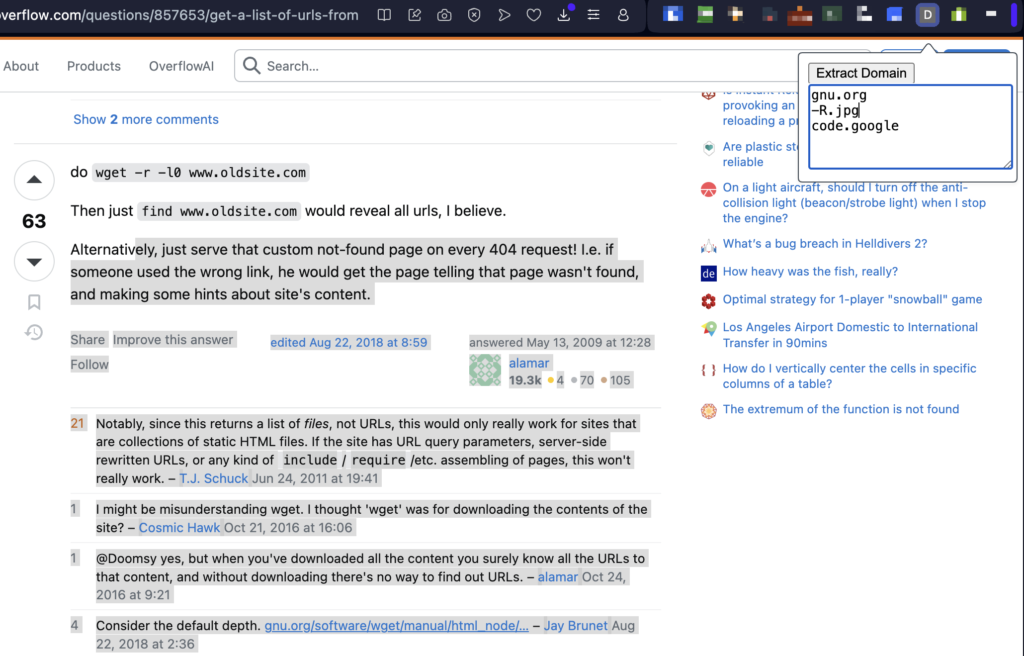
The Domain Extractor Free Tool is a lightweight and intuitive Chrome extension that allows users to extract domain names effortlessly from any content they highlight while browsing. With just a few clicks, this tool automates the tedious process of manually sifting through content to identify and list domain names.
Whether you’re building prospect lists, researching competitors, or curating resources, this tool saves you time and effort by instantly providing a clean list of extracted domains.
Key Features of the Domain Extractor Free Tool
- Effortless Domain Extraction
Highlight any content on a webpage, right-click, and let the extension work its magic. Within seconds, it identifies and extracts all domain names from the selected text. - Clean and Simple Interface
The tool boasts an intuitive interface, making it easy for users of all skill levels to navigate. No technical expertise required—install it, activate it, and start extracting! - Free to Use
Unlike other tools that hide features behind paywalls, the Domain Extractor Free Tool is completely free to download and use. - Automatic Filtering
The tool intelligently filters and extracts only valid domain names, ensuring your output is clean and ready to use. - Downloadable Results
Easily export your extracted domains into a .txt or .csv file for further use, whether you’re organizing leads, analyzing data, or planning outreach. - Privacy-Friendly
Your data stays with you. The Domain Extractor Free Tool operates locally within your browser, ensuring no content is shared or stored externally.
Who Can Benefit from the Domain Extractor Free Tool?
This tool is a must-have for various professionals, including:
- Digital Marketers: Extract domains for competitor analysis, backlink research, or outreach campaigns.
- Web Developers: Quickly compile a list of domains for testing or integration.
- Researchers and Academics: Gather domain data for studies or reports with minimal effort.
- Content Creators: Identify referenced sources or curate resources without combing through pages manually.
- Everyday Users: Simplify your workflow whenever you need a quick list of domains from web content.
How to Install and Use the Domain Extractor Free Tool
Getting started is simple:
- Install the Extension:
Head over to the Chrome Web Store, search for the Domain Extractor Free Tool, and click “Add to Chrome.” - Activate the Extension:
Once installed, activate the tool from the extensions menu in your browser. - Highlight and Extract:
Highlight the desired text on a webpage, right-click, and select “Extract Domains.” A list of domains will instantly appear in a pop-up. - Export or Save Results:
Use the built-in export function to save your extracted domains in a .txt or .csv format.
Why Choose the Domain Extractor Free Tool?
In an era of productivity tools, the Domain Extractor Free Tool stands out for its simplicity, utility, and cost-effectiveness. Unlike bulky software or premium services, it focuses on doing one thing—and doing it well. With this tool, you’ll no longer waste hours manually extracting domains from pages of content. Instead, you’ll enjoy a seamless, efficient, and free solution.
Conclusion
The Domain Extractor Free Tool is a must-have Chrome extension for anyone who deals with domains regularly. Its ease of use, accuracy, and no-cost accessibility make it an essential addition to your browser. Whether you’re conducting research, building lists, or simply exploring the web, this tool puts domain extraction at your fingertips.
So why wait? Download the Domain Extractor Free Tool today from the Chrome Web Store and transform the way you handle domains. Your time is valuable—let this tool help you make the most of it!